




This guide is part of the Google Chrome series
1.
Add a Facebook button to your toolbar in Chrome
2. Clear search history in Chrome ver 12.0.742.112
3. Have the same tabs open when Chrome is started
4. How to bookmark all tabs in Chrome
5. How to check your Google Chrome version
6. How to clear certain pages from web history
7. How to clear search history in Google Chrome
8. How to create a send email link in Chrome
9. How to install Angry Birds for the Chrome browser
10. How to install email extension for Chrome
2. Clear search history in Chrome ver 12.0.742.112
3. Have the same tabs open when Chrome is started
4. How to bookmark all tabs in Chrome
5. How to check your Google Chrome version
6. How to clear certain pages from web history
7. How to clear search history in Google Chrome
8. How to create a send email link in Chrome
9. How to install Angry Birds for the Chrome browser
10. How to install email extension for Chrome
Make: Google
Model / Product: Chrome
Version: 10.0.648.205
Objective / Info: Learn how to install Angry Birds on the Chrome web browser. goo.gl .
Model / Product: Chrome
Version: 10.0.648.205
Objective / Info: Learn how to install Angry Birds on the Chrome web browser. goo.gl .
1
Visit the Chrome webstore online at http://goo.gl/lHooq.
Note :
Click this url in the "Objective / Info" box above. If you do not have a Google account, you can create one for free but one is required.
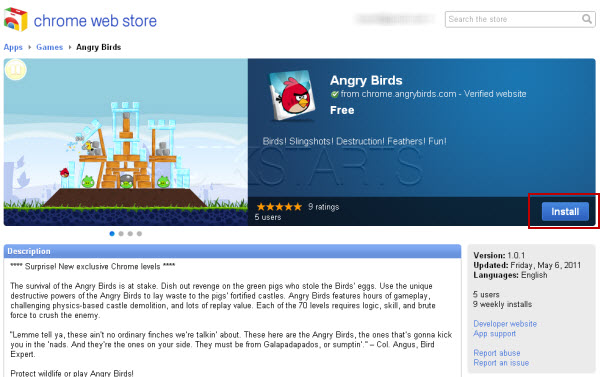
2
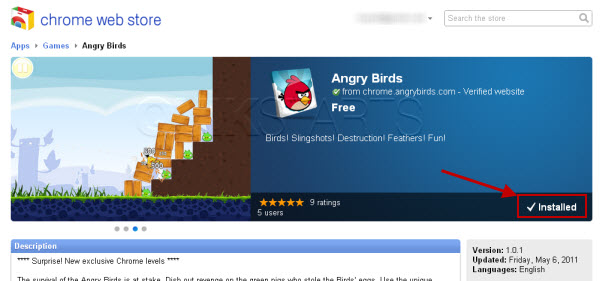
Click the "Install" button.
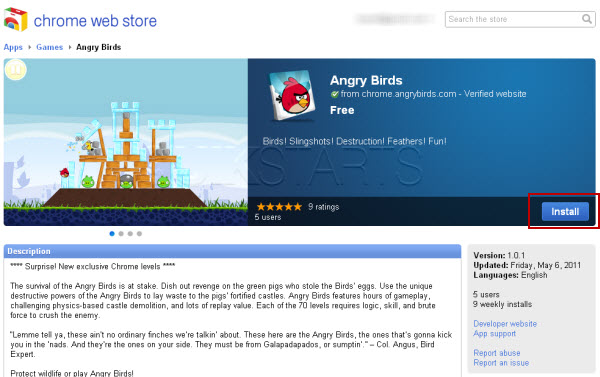
3
Following the installation, the button should change to display "Installed" and another tab or window should open as seen in the next step.
4
This task should now be complete. If not, review and repeat the steps as needed. Submit any questions using the section at the bottom of this page.
Note :
You may be prompted to update your version of Chrome. In this example we updated to 11.0.696.65 before Angry Birds could actually be played. The update instructions should appear on the screen.


comments powered by Disqus
 Ask a question or provide an answer